SMS Notification Opt-In Process
How Customers Consent to SMS Notifications
Zippy collects explicit opt-in consent for SMS notifications through our customer portal. Customers must actively enable SMS notifications and verify their phone number before receiving any text messages.
Opt-In Process
- Customer logs into their Zippy account at zippydoes.com
- Customer navigates to their Dashboard and opens "Notification Settings"
- Customer enables "SMS Notifications" toggle
- Customer enters their phone number in the provided field
- Customer clicks "Send Verification Code" button
- Customer receives a 6-digit verification code via SMS
- Customer enters the verification code to confirm their phone number
- Only after verification is complete will the customer receive service-related SMS notifications
SMS Opt-In Interface Screenshot
Below is a screenshot of the actual SMS notification opt-in interface from our customer portal. This shows the explicit consent mechanism where customers must:
- Toggle on "Text Messages (SMS)" to enable notifications
- Enter their phone number in the provided field
- Click "Verify" to receive a verification code via SMS
- Complete verification before receiving any messages
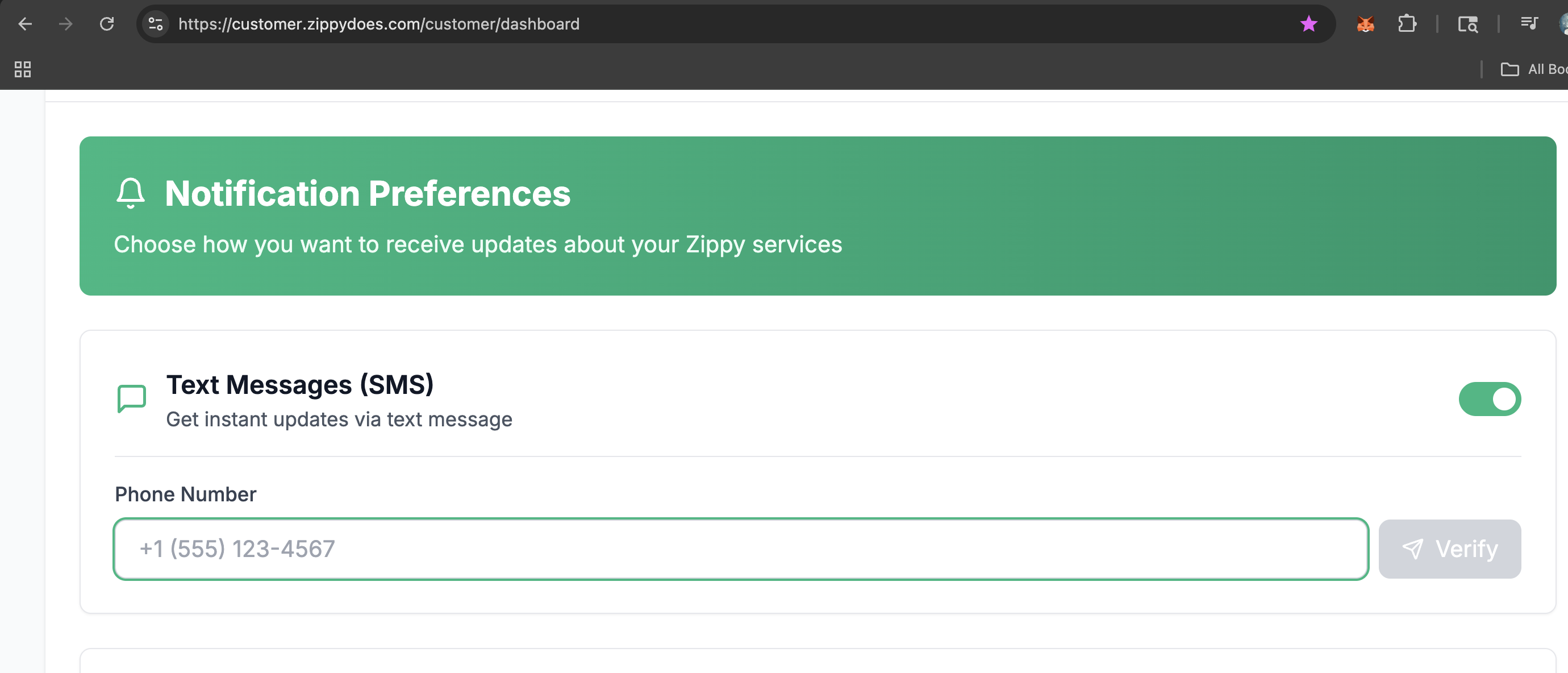
Screenshot of SMS opt-in interface at https://zippydoes.com/customer/dashboard (requires authentication)
Detailed Opt-In Process
Step 1: Notification Settings Section
Customers access notification preferences from their dashboard. They can see all notification channels (Email, SMS, Push) and their current status.
Screenshot location: Customer Dashboard → Notification Settings
URL: https://zippydoes.com/customer/dashboard
Step 2: SMS Notification Opt-In Toggle
Customer enables SMS notifications by toggling the switch. This reveals the phone number input field.
The interface clearly shows: "Enable SMS Notifications" with an on/off toggle
Step 3: Phone Number Entry and Verification
Customer enters their phone number and clicks "Send Verification Code". They receive a text message with a 6-digit code.
Interface includes: Phone number input field + "Verify" button (as shown in screenshot above)
Verification SMS: "Your Zippy verification code is: [6-digit code]. This code expires in 10 minutes."
Step 4: Code Verification
Customer enters the 6-digit code they received. Upon successful verification, their phone number is confirmed and SMS notifications are activated.
Interface shows: "Enter verification code" input field + "Verify" button
Success message: "Phone number verified successfully!"
Message Types
After opting in, customers receive transactional SMS notifications related to their booked services:
- Service booking confirmations
- Professional arrival notifications with ETA updates
- Service completion notifications
- Payment reminders for recurring services
- Time-sensitive updates about scheduled services
Opt-Out Process
Customers can opt out of SMS notifications at any time by:
- Returning to Notification Settings and disabling the SMS toggle
- Replying STOP to any SMS message from Zippy
- Contacting customer support at info@zippydoes.com
For Compliance Review
Access to Customer Portal: The notification settings are located at https://zippydoes.com/customer/dashboard (requires customer authentication).
Compliance Documentation: This page serves as public documentation of our SMS opt-in process for compliance and verification purposes.
Contact: For questions about our SMS opt-in process, contact info@zippydoes.com
Last Updated: September 4, 2026